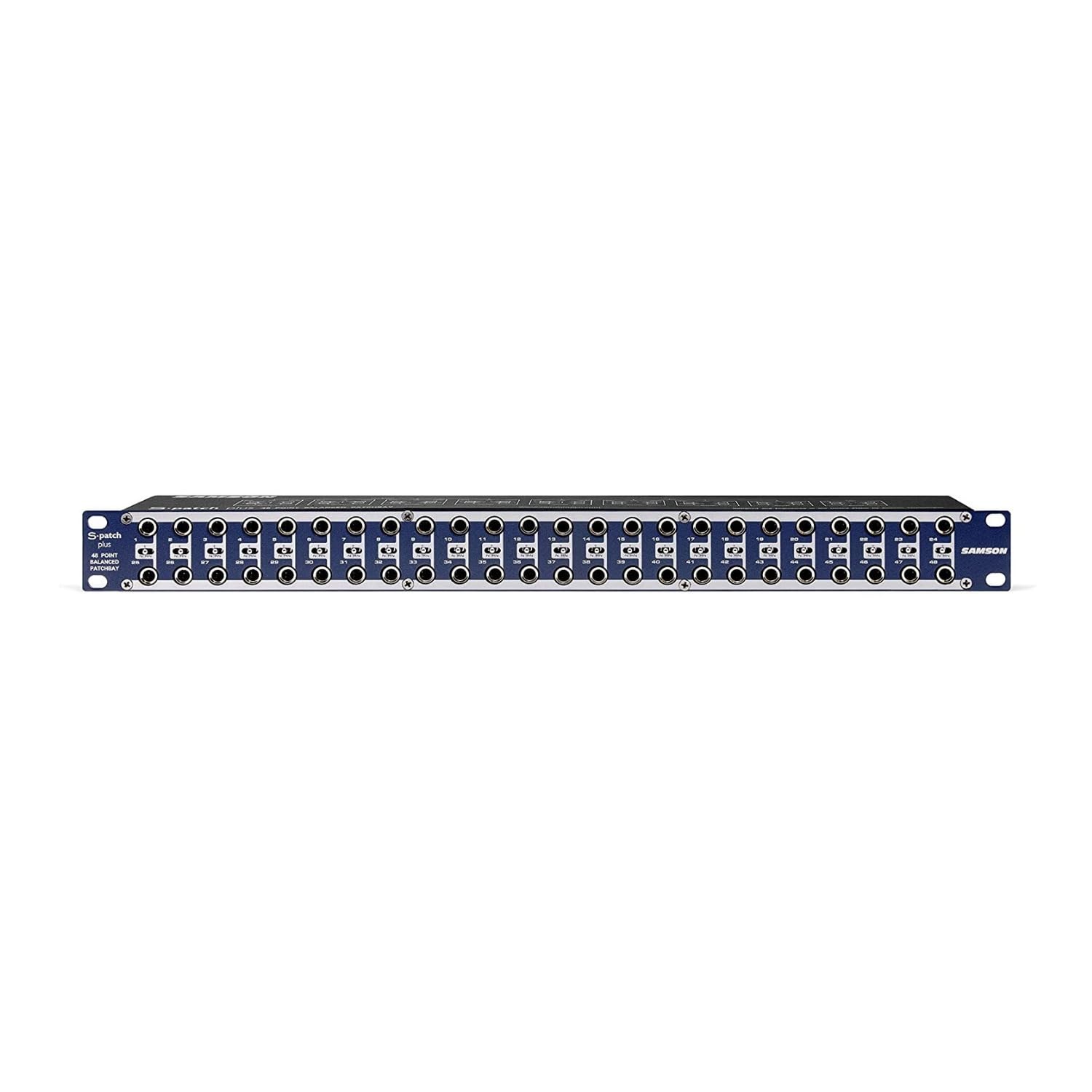
The Samson S-Patch Plus is a 48-point balanced patch bay designed to bring studio connections within easier reach.
This Samson S-Patch Plus review looks at its configurable routing and the setup decisions to consider before adding it to a rack.
S-Patch Plus Review Summary
The quick verdict
500+ ratings
Read Amazon ReviewsSamson S-Patch Plus
A practical fit for recording setups that need centralized, configurable routing through balanced 1/4-inch connections in a single rack space.
- 48 fully balanced patch points in a single-space rack unit.
- 1/4-inch phone connections on both front and rear panels.
- Miniature front-panel toggles configure each patch point pair for Normalled, Half-normalled, or Thru operation.
- Centralizes connections for studio signal flow and effects-chain patching.

Pros
- High patch-point count in a single rack space.
- Front access can simplify changes to connections without reaching behind rack equipment.
Consider before buying
- Its usefulness depends on having compatible 1/4-inch connections across the equipment you plan to route.
- The selectable modes and many patch points call for a deliberate routing plan and clear labeling.
Read the full review summary
The S-Patch Plus puts 48 balanced 1/4-inch patch points in one rack space, with front-panel toggles for choosing Normalled, Half-normalled, or Thru behavior for each patch point pair.
That combination can make frequently changed studio routes easier to manage from the front of a rack, rather than requiring access to equipment connections at the back.
It is best suited to recording or effects setups with enough compatible 1/4-inch connections to benefit from a central routing point.
Before buying, map the equipment you intend to connect and confirm the desired top and bottom row routing, rack space, and cable plan; the patch bay organizes connections, but it does not remove the need to plan them.
The buying factors
S-Patch Plus Scorecard
Editorial scores reflect listed features and buyer fit; they are not laboratory measurements or customer ratings.
Routing capacity
48 patch points offer room to centralize many studio connections in a single rack space.
Routing flexibility
Per-pair Normalled, Half-normalled, and Thru modes accommodate several common routing approaches.
Front-panel access
Front connections and mode toggles place patching controls where they are reachable in a rack.
Connection format
Balanced 1/4-inch phone connections suit compatible studio gear, but buyers must check their own connection types.
Setup clarity
The selectable modes offer flexibility, while making it important to plan and label the intended signal paths.
Rack integration
The one-rack-space format provides a compact home for a substantial number of patch points.
Key Features and Specifications of S-Patch Plus
- 48 fully balanced patch points in a single-space rack unit.
- 1/4-inch phone connections on both front and rear panels.
- Miniature front-panel toggles configure each patch point pair for Normalled, Half-normalled, or Thru operation.
- Centralizes connections for studio signal flow and effects-chain patching.
- In Thru mode, the rear top connection routes to the front top connection; the bottom row routes from front input to rear output.
Pros and Cons of S-Patch Plus
Pros
- High patch-point count in a single rack space.
- Front access can simplify changes to connections without reaching behind rack equipment.
- Three selectable modes support different routing arrangements at each patch point pair.
- Balanced 1/4-inch connections fit setups built around compatible studio equipment.
Consider before buying
- Its usefulness depends on having compatible 1/4-inch connections across the equipment you plan to route.
- The selectable modes and many patch points call for a deliberate routing plan and clear labeling.
- Buyers seeking a different connector format or a simpler fixed connection layout should compare those needs before choosing.
Who Should Buy S-Patch Plus?
Good fit
Consider the S-Patch Plus if your recording or effects setup has many balanced 1/4-inch connections and you regularly alter signal paths.
Its 48 patch points and front-access controls can make the bay a useful central place to manage those changes.
It also makes sense when different routes call for different connection behavior.
Being able to select Normalled, Half-normalled, or Thru for each pair offers flexibility as a setup evolves, provided you are comfortable mapping each pair and keeping the panel understandable.
Who should skip it
Skip it if your equipment does not use compatible 1/4-inch connections, or if your routing needs are already served by a small, fixed set of connections.
First check the connectors and routes on the gear you plan to include.
It may also be more patch capacity and configuration than a compact, rarely changed setup needs. Count the connections you expect to use and decide whether a full rack-space bay fits your workflow.
How the S-Patch Plus Fits a Studio Routing Setup
Capacity in one rack space
The 48-point layout gives a studio a way to bring many equipment connections to a shared front panel while occupying a single rack space.
That can be useful when several sources, processors, or effects chains need accessible patch points; planning the actual connection map helps ensure the available capacity serves the intended setup.
Choosing a mode for each pair
Normalled, Half-normalled, and Thru settings let each patch point pair follow a selected routing behavior.
This gives the bay room to support more than one style of signal flow, but it also means the user should decide what each pair is meant to do and make those choices easy to identify during later sessions.
Front access and cable planning
With connections and mode switches on the front, routine patch changes can happen at the rack face.
The rear connections still need to be wired to the relevant equipment, so it is sensible to plan cable runs and leave enough access to install or revise them.
Checking fit with existing equipment
The specified connection format is balanced 1/4-inch phone.
Before choosing the bay, check the connection types and routing needs of every device in the planned chain; a centralized panel is most useful when it can connect the equipment you actually intend to patch.
Alternatives to S-Patch Plus
No alternative model is recommended here. Compare the design and features that matter to your routing routine before choosing another option.
Is S-Patch Plus Worth It?
The Samson S-Patch Plus is worth considering for a rack-based recording or effects setup that needs many accessible, configurable balanced 1/4-inch patch points.
Its combination of 48 points, front-panel access, and three selectable modes gives buyers a flexible way to organize connections in one rack space.
Buy if your equipment and routing plan match that format and capacity.
Check the connector types, map the intended signal paths, and consider whether you will maintain clear labels; a smaller or differently connected setup may not benefit as much from this much patching flexibility.
Your review at a glance
500+ ratings
Read Amazon ReviewsSamson S-Patch Plus
A practical fit for recording setups that need centralized, configurable routing through balanced 1/4-inch connections in a single rack space.
- 48 fully balanced patch points in a single-space rack unit.
- 1/4-inch phone connections on both front and rear panels.
- Miniature front-panel toggles configure each patch point pair for Normalled, Half-normalled, or Thru operation.
- Centralizes connections for studio signal flow and effects-chain patching.